
You can easily change the password if you have access to your WordPress account.
1. Log in to the WordPress dashboard.
2. From the Dashboard menu, go to Users and click on Profile.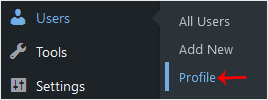
3. Scroll down to Account Management and click on Set New Password.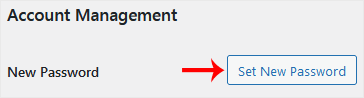
4. Copy the password to a safe place and click on Update Profile to change your password.
База знань
Якщо Ви не змогли знайти відповідь в нашій базі знань, Ви можете створити квиток, обравши відповідний відділ.
How to Change the Password of a WordPress Account
0
Ця відповідь Вам допомогла?
Back
Updated knowledgebase article view

