
Thunderbird is a friendly email client software for managing your email. You can set up a cPanel email account with Mozilla Thunderbird and receive/send the email.
1. Open Mozilla Thunderbird.

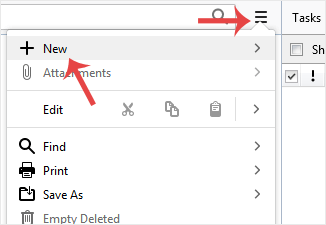
2. Click on the menu icon located on the right side of the screen and choose New. A drop box will open.
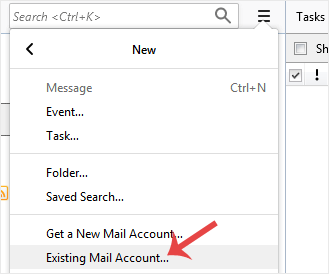
3. Click on Existing Mail Account.
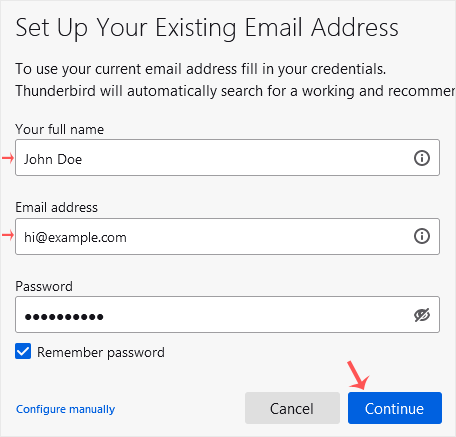
4. In the Mail Setup Account, fill out your name, full email address, and your email account password. Proceed with Continue.
5. It may take a few minutes to configure your email account. After that, click on Done.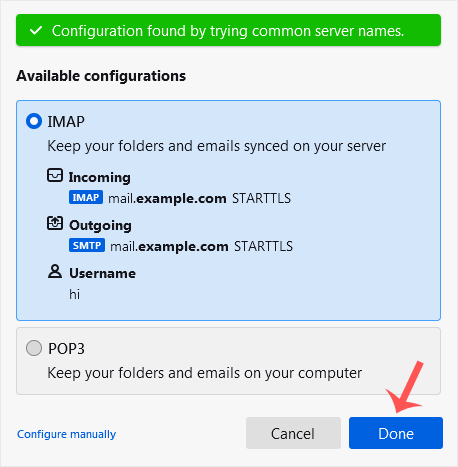
6. If it shows an SSL Security Exception, click on Confirm Security Exception and the warning will disappear.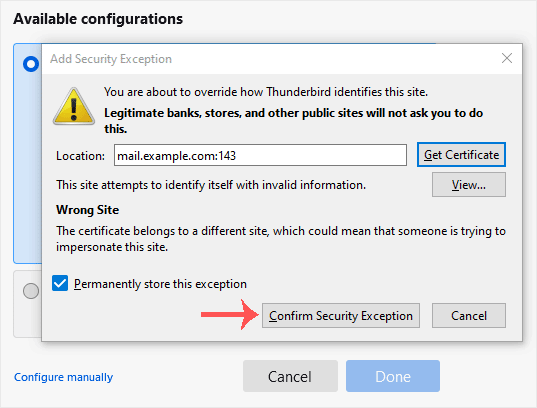
Congratulations, your email is set up successfully. You can now manage your email through Mozilla Thunderbird.
Bilgi Bankası
Sorunlarınızın çözümünü Bilgi Merkezi'nde bulamadıysanız, aşağıdan ilgili departmanı seçerek destek için bizlere bildirim gönderebilirsiniz.
How to Setup a cPanel Email Account in Mozilla Thunderbird
0
Bu cevap yeterince yardımcı oldu mu?
Back
Updated knowledgebase article view

