
You can reply to emails using Outlook 2019 instead of cPanel Webmail.
1. Open Outlook 2019.

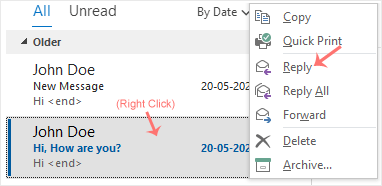
2. Right-click the email you want to reply to and select Reply.
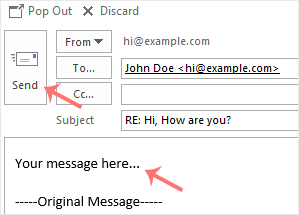
3. On the right side, the response box will open. Enter your message and click Send.
Det du inte kan hitta en lösning på i vår kunskapsdatabas kan du få hjälp med genom att kontakta oss. Välj den avdelning som passar bäst från listan under och skicka in ditt ärende.
You can reply to emails using Outlook 2019 instead of cPanel Webmail.
1. Open Outlook 2019.
2. Right-click the email you want to reply to and select Reply.
3. On the right side, the response box will open. Enter your message and click Send.

We use essential cookies to ensure our billing portal and shopping cart function correctly. We also use optional analytical cookies to improve your experience on our site. By clicking "Accept," you agree to our use of cookies as described in our Privacy Policy.
More information