
The automatic installation of a plugin is easy and straightforward. However, you can also install it manually. It will involve manually downloading a plugin, uploading, and activating it.
Make sure you have already downloaded a zip file of the plugin to your desktop.
1. Log in to the WordPress dashboard.
2. From the Dashboard menu, go to Plugins and click on Add New.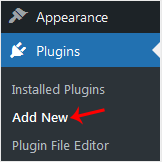
3. Click on Upload Plugin and then on Browse. Choose your plugin's zip file and click Install Now.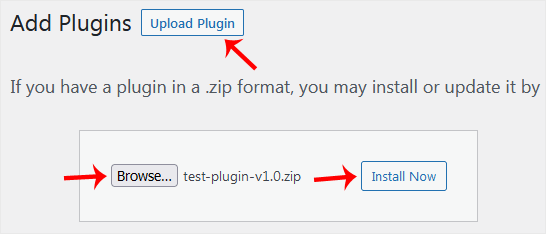
4. Click on Activate Plugin.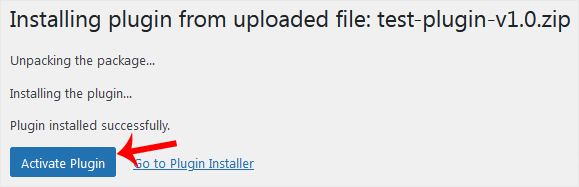
Note: After activating a plugin, a new menu of that plugin is added to the Dashboard menu.
Hjälpcentral
Det du inte kan hitta en lösning på i vår kunskapsdatabas kan du få hjälp med genom att kontakta oss. Välj den avdelning som passar bäst från listan under och skicka in ditt ärende.
How to Manually Install a WordPress Plugin
0
Hjälpte svaret dig?
Back
Updated knowledgebase article view

