
You can find our nameservers in your hosting welcome email. You need to update your domain nameservers to our nameservers.
If your domain is registered on 123-Reg, you should follow this tutorial to update your domain's Nameservers.
1. Open the 123-reg.co.uk website and click on Control Panel. It will show you a login form.
2. Enter the username and password of your 123-reg account and click on Log-in.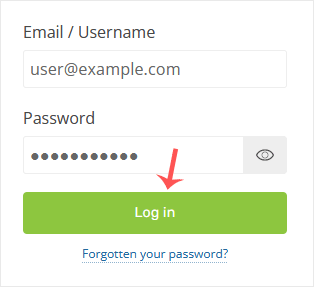
3. After a successful login, select the appropriate domain from the drop-down list and then click on Manage.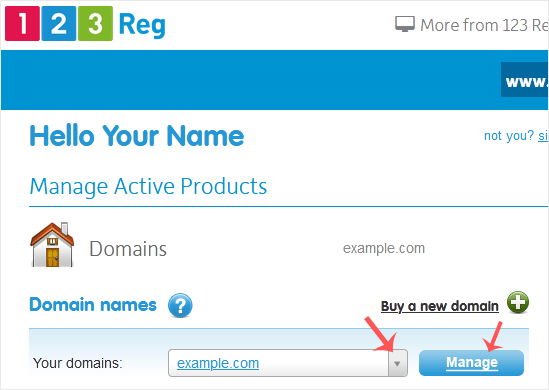
4. Scroll down to the Advanced domain settings and click on Change Nameservers (DNS).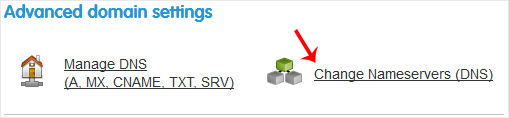
5. Enter your nameservers in the text fields and click on Update.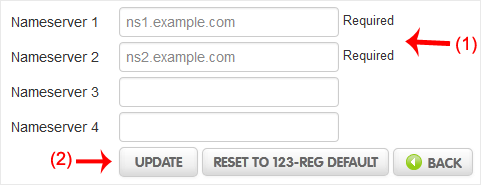
You will see a success message.
Note: It may take anywhere from 12 to 24 hours for the changes to take effect worldwide.
Hjälpcentral
Det du inte kan hitta en lösning på i vår kunskapsdatabas kan du få hjälp med genom att kontakta oss. Välj den avdelning som passar bäst från listan under och skicka in ditt ärende.
How to Update the DNS Nameservers at 123-Reg
0
Hjälpte svaret dig?
Back
Updated knowledgebase article view

