
BoxTrapper requires all email senders not on your Whitelist to respond to verification emails. It protects you from spam.
If you want to get rid of unwanted emails, enable Boxtrapper either on all emails or just selected emails and configure it.
1. Log in to your cPanel Account,
2. In the Email section, click on BoxTrapper.

3. On the BoxTrapper's page, you see a list of your emails under the Account heading and the status of BoxTrapper under the Status heading. Choose Manage.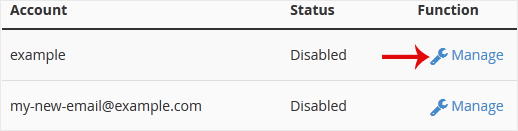
4. On the BoxTrapper's Manage page, if the status is Disabled, Choose Enable.
Hjälpcentral
Det du inte kan hitta en lösning på i vår kunskapsdatabas kan du få hjälp med genom att kontakta oss. Välj den avdelning som passar bäst från listan under och skicka in ditt ärende.
How to Enable BoxTrapper in cPanel
0
Hjälpte svaret dig?
Back
Updated knowledgebase article view

