
The automatic installation of a plugin is easy and straightforward. However, you can also install it manually. It will involve manually downloading a plugin, uploading, and activating it.
Make sure you have already downloaded a zip file of the plugin to your desktop.
1. Log in to the WordPress dashboard.
2. From the Dashboard menu, go to Plugins and click on Add New.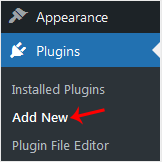
3. Click on Upload Plugin and then on Browse. Choose your plugin's zip file and click Install Now.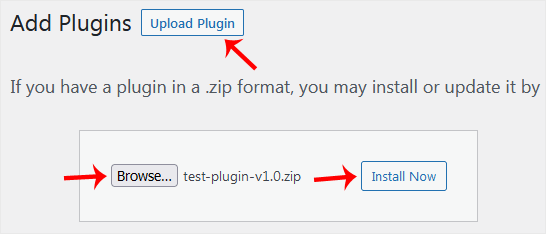
4. Click on Activate Plugin.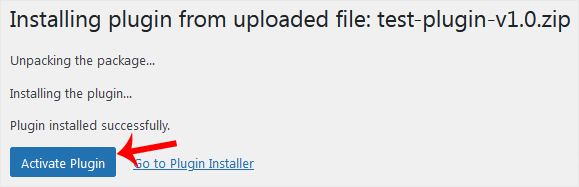
Note: After activating a plugin, a new menu of that plugin is added to the Dashboard menu.
Base de conocimientos
Si no encuentra una solución a sus problemas en nuestra base de conocimientos, puede enviar un ticket seleccionando el departamento correspondiente a continuación.
How to Manually Install a WordPress Plugin
0
¿Le ha resultado útil esta respuesta?
Back
Updated knowledgebase article view

