
You can forward an email to other email accounts using Mozilla Thunderbird.
1. Open Mozilla Thunderbird.

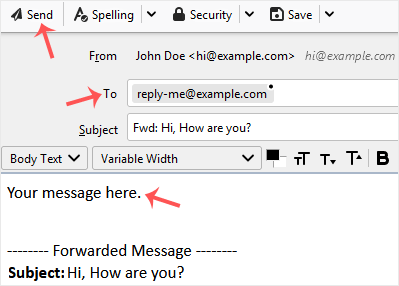
2. Go to Inbox. Select the message you want to forward, and it will show the Forward option. Click it.

3. Type your message in the message box. Do not modify the email title and the rest of the text. Then click on send.
Base de conocimientos
Si no encuentra una solución a sus problemas en nuestra base de conocimientos, puede enviar un ticket seleccionando el departamento correspondiente a continuación.
How to Forward an Email in Mozilla Thunderbird
0
¿Le ha resultado útil esta respuesta?
Back
Updated knowledgebase article view

