
1. Log in to your cPanel account.
2. In the Databases section, click on MySQL Databases.

3. Under Current Databases, you can see a list of all your databases. Locate the database you want to remove and click on Delete.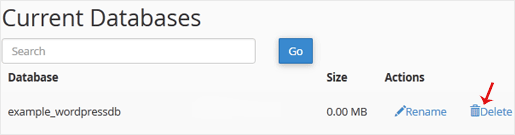
4. Click on Delete Database.
Dacă nu găsiți soluția problemei în biblioteca noastră de cunoștințe, trimiteți o sesizare de suport, alegând mai jos departamentul potrivit.
1. Log in to your cPanel account.
2. In the Databases section, click on MySQL Databases.
3. Under Current Databases, you can see a list of all your databases. Locate the database you want to remove and click on Delete.
4. Click on Delete Database.

We use essential cookies to ensure our billing portal and shopping cart function correctly. We also use optional analytical cookies to improve your experience on our site. By clicking "Accept," you agree to our use of cookies as described in our Privacy Policy.
More information