
You can send an email using Thunderbird. It is quite straightforward as you do not need to log in to the cPanel webmail manually. You can send an email directly using the Mozilla Thunderbird email client.
1. Open Mozilla Thunderbird.
2. On the left side of the top menu, click on Write. 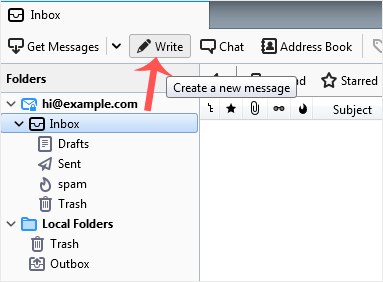
If you have multiple email accounts, click on your account, and a drop-down menu will open. Then select the appropriate email and enter the email account of the person you want to send an email to in the To field.
In the subject field, enter the subject of your email, enter your message in the Message box, and then click on Send.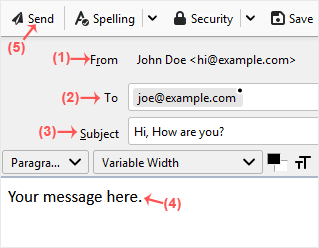
Base de Conhecimento
Se não conseguir encontrar a solução para o seu problema na nossa Base de Conhecimento, poderá enviar um Ticket de Suporte para o departamento seleccionado em baixo.
How to Send an Email Using Mozilla Thunderbird
0
Esta resposta foi útil?
Back
Updated knowledgebase article view

