
You can easily change the password if you have access to your WordPress account.
1. Log in to the WordPress dashboard.
2. From the Dashboard menu, go to Users and click on Profile.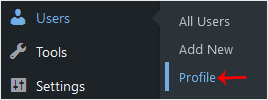
3. Scroll down to Account Management and click on Set New Password.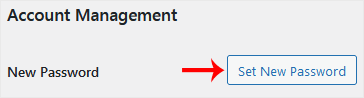
4. Copy the password to a safe place and click on Update Profile to change your password.
Kunnskapsbase
Dersom du ikke kan finne en løsning på ditt spørsmål eller problem i vår kunnskapsbase kan du få hjelp ved å kontakte oss. Velg den avdelingen som passer best fra listen under og send inn din henvendelse.
How to Change the Password of a WordPress Account
0
Var dette svaret til hjelp?
Back
Updated knowledgebase article view

