
If you want to delete an FTP account, you can accomplish it by following this tutorial.
1. Log in to your cPanel account.
2. In the Files section, click on FTP Accounts.

3. Under the FTP Accounts list, choose Delete.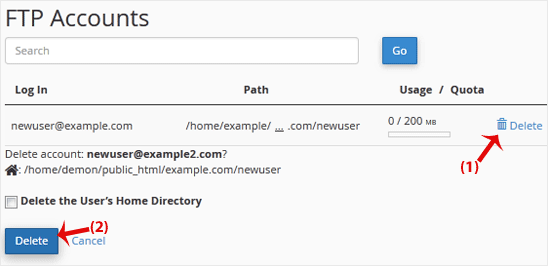
4. Click on Delete once again to confirm and remove the FTP account.
Warning: Do not use the Delete the Users Home Directory option. Otherwise, the data inside your FTP user account will also be deleted and will become unrecoverable unless you restore it with a backup.
Kunnskapsbase
Dersom du ikke kan finne en løsning på ditt spørsmål eller problem i vår kunnskapsbase kan du få hjelp ved å kontakte oss. Velg den avdelingen som passer best fra listen under og send inn din henvendelse.
How to Delete an FTP User Account From cPanel
0
Var dette svaret til hjelp?
Back
Updated knowledgebase article view

