
You can easily change the password if you have access to your WordPress account.
1. Log in to the WordPress dashboard.
2. From the Dashboard menu, go to Users and click on Profile.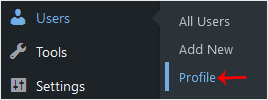
3. Scroll down to Account Management and click on Set New Password.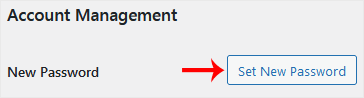
4. Copy the password to a safe place and click on Update Profile to change your password.
Base de connaissances
Si vous ne trouvez pas la réponse dans la base de connaissances, n'hésitez pas à nous envoyer un message à l'aide du formulaire ci-dessous.
How to Change the Password of a WordPress Account
0
Cette réponse était-elle pertinente ?
Back
Updated knowledgebase article view

