
You can easily change the password if you have access to your WordPress account.
1. Log in to the WordPress dashboard.
2. From the Dashboard menu, go to Users and click on Profile.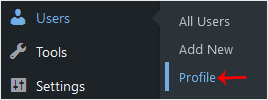
3. Scroll down to Account Management and click on Set New Password.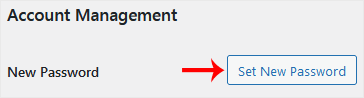
4. Copy the password to a safe place and click on Update Profile to change your password.
مرکز آموزش
اگر شما در بانک اطلاعاتی ما راه حلی برای مشکلتان نمیابید میتوانید با انتخاب بخش مناسب درخواست خود را ارسال کنید..
How to Change the Password of a WordPress Account
0
آیا این پاسخ به شما کمک کرد؟
Back
Updated knowledgebase article view

