
1. Log in to your cPanel account.
2. In the Databases section, click on MySQL Databases.

3. In the New Database field, enter a name for the new database you wish to create.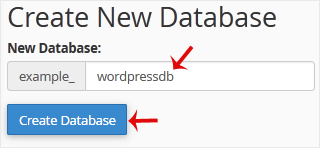
4. Click on Create Database.
Knowledgebase
If you can't find a solution to your problems in our knowledgebase, you can submit a ticket by selecting the appropriate department below.
How to Create a Database in cPanel
0
Was this answer helpful?
Back
Updated knowledgebase article view

