
1. Open Outlook 2019.

2. In the left panel. You can see a list of your email accounts, double-click on it to expand.
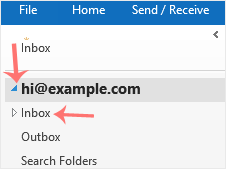
3. Click on Inbox, and it will start syncing.
Hvis du ikke kan finde et svar på dine spørgsmål i vores vidensdatabase kan du oprette en support sag ved at vælge support afdeling nedenfor.

We use essential cookies to ensure our billing portal and shopping cart function correctly. We also use optional analytical cookies to improve your experience on our site. By clicking "Accept," you agree to our use of cookies as described in our Privacy Policy.
More information