
BoxTrapper requires all email senders not on your Whitelist to respond to verification emails. It protects you from spam.
If you want to get rid of unwanted emails, enable Boxtrapper either on all emails or just selected emails and configure it.
1. Log in to your cPanel Account,
2. In the Email section, click on BoxTrapper.

3. On the BoxTrapper's page, you see a list of your emails under the Account heading and the status of BoxTrapper under the Status heading. Choose Manage.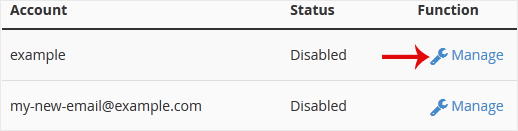
4. On the BoxTrapper's Manage page, if the status is Disabled, Choose Enable.
Databáze řešení
Pokud nemůžete najít řešení Vašeho problému v naši databázi řešení, založte níže support tickt a zvolte odpovídající oddělení.
How to Enable BoxTrapper in cPanel
0
Byla tato odpověď nápomocná?
Back
Updated knowledgebase article view

