
BoxTrapper requires all email senders not on your Whitelist to respond to verification emails. It protects you from spam.
If you want to get rid of unwanted emails, enable Boxtrapper either on all emails or just selected emails and configure it.
1. Log in to your cPanel Account,
2. In the Email section, click on BoxTrapper.

3. On the BoxTrapper's page, you see a list of your emails under the Account heading and the status of BoxTrapper under the Status heading. Choose Manage.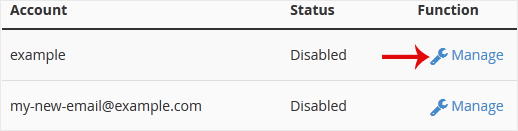
4. On the BoxTrapper's Manage page, if the status is Disabled, Choose Enable.
知識庫
如果您無法在我們的知識庫找到您問題的解決方案,您可以在下方選擇適當的部門來發出服務單申請。
How to Enable BoxTrapper in cPanel
0
這篇文章有幫助嗎?
Back
Updated knowledgebase article view

