
You can easily change the password if you have access to your WordPress account.
1. Log in to the WordPress dashboard.
2. From the Dashboard menu, go to Users and click on Profile.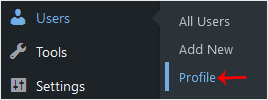
3. Scroll down to Account Management and click on Set New Password.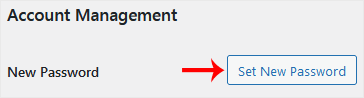
4. Copy the password to a safe place and click on Update Profile to change your password.
Preguntes Freqüents - FAQ
Si no pot trobar una solució al seu problema a la base de coneixements, pot enviar un tiquet de suport triant el departament adequat abaix.
How to Change the Password of a WordPress Account
0
Ha estat útil la resposta?
Back
Updated knowledgebase article view

